



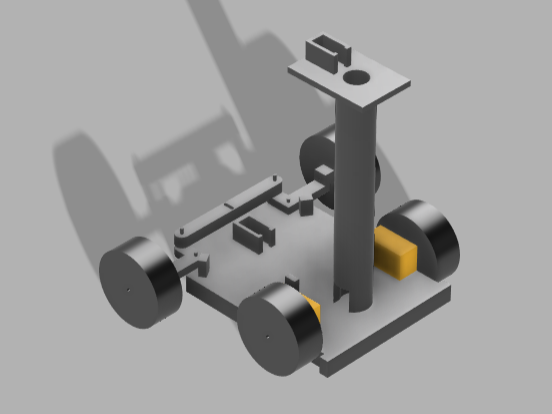
Step-by-Step Construction of the Autonomous Thermal-Guided Pest Detection and Precision Spraying Rover
The rover is built by integrating the mechanical structure, electronic hardware, sensing system, computer vision, navigation algorithms, and spraying mechanism into a single autonomous platform. The following methodology describes the complete development process.
Step 1: Design the Rover Chassis

The first stage involves designing a sturdy mobile platform capable of carrying all electronic components, batteries, pesticide tank, and sensors.
Components Mounted
- Aluminum/Acrylic Chassis
- Two DC geared motors
- Two free wheels/caster wheels
- Battery holder
- Raspberry Pi mounting plate
- Pump mounting bracket
Outcome
A stable four-wheel differential-drive rover capable of moving through agricultural fields.
Step 2: Install the Drive System
The DC geared motors are mounted on the chassis and connected to the motor driver.
Connections
- Left Motor → Motor Driver
- Right Motor → Motor Driver
- Motor Driver → Arduino
- Battery → Motor Driver
The Arduino receives movement commands from the Raspberry Pi and controls the motor driver accordingly.
Functions
- Forward
- Reverse
- Left Turn
- Right Turn
- Stop
Step 3: Install the Thermal Camera


A thermal camera is mounted at the front of the rover with an unobstructed field of view.
Purpose
The camera continuously scans crops and measures temperature variations.
Thermal hotspots caused by pest infestation appear as localized regions with abnormal temperatures.
The camera sends thermal data directly to the Raspberry Pi through the I²C interface.
Step 4: Install the RGB Camera
An RGB camera is mounted beside the thermal camera.
Purpose
- Capture high-resolution crop images
- Validate thermal detections
- Support future AI pest classification (YOLO)
- Improve localization using thermal-RGB sensor fusion
Step 5: Mount Obstacle Detection Sensors

Three ultrasonic sensors are installed:
- Front
- Left
- Right
Function
The sensors continuously measure surrounding distances.
Whenever an obstacle is detected within approximately 20 cm, the rover:
- Stops
- Calculates a new route
- Continues navigation safely
Step 6: Install the Spraying System

- Pesticide reservoir
- 12 V diaphragm pump
- Relay module
- Spray nozzle
- Silicone tubing
Working
The relay switches the pump ON only when the rover reaches the infected plant.
The nozzle sprays pesticide for approximately 3 seconds before switching OFF.
This minimizes chemical usage.
Step 7: Connect the Electronics
The complete electronic system is assembled.
Raspberry Pi
Responsible for:
- Thermal image processing
- Computer vision
- AI inference
- Path planning
- High-level decision making
Arduino
Responsible for:
- Motor control
- Pump activation
- Reading ultrasonic sensors
- PWM generation
Communication between Raspberry Pi and Arduino is established using USB Serial or UART.
Step 8: Develop the Software
The software stack is implemented on the Raspberry Pi.
Major Modules
- Thermal Image Acquisition
- Thermal Thresholding
- Hotspot Detection
- Centroid Calculation
- Coordinate Generation
- Path Planning (A*)
- Obstacle Avoidance
- Motion Control
- Spray Control
- Data Logging
The software continuously processes sensor data and makes autonomous decisions.
Step 9: Thermal Pest Detection

The thermal camera generates a temperature map of the crop.
The software:
- Reads every temperature pixel
- Applies a threshold
- Detects abnormal regions
- Identifies potential pest hotspots
- Calculates the center coordinates of the hotspot
These coordinates become the navigation target.
Step 10: Autonomous Navigation
Once a hotspot is identified:
- Target coordinates are generated.
- The A* algorithm computes the shortest collision-free path.
- The rover moves toward the infected plant.
- Ultrasonic sensors monitor for obstacles.
- If an obstacle is encountered, the route is recalculated.
- Navigation resumes until the rover reaches the target.
Step 11: Precision Spraying
When the rover is within approximately 30 cm of the target:
- The motors stop.
- The relay activates the pump.
- The nozzle sprays pesticide for the predefined duration.
- The pump turns OFF automatically.
- The rover resumes scanning for the next hotspot.
Only infected plants receive pesticide, reducing chemical usage and environmental impact.
Step 12: Field Testing and Validation
The completed rover is tested under real or simulated field conditions.
Validation includes:
- Thermal hotspot detection accuracy
- Navigation performance
- Obstacle avoidance
- Spray targeting precision
- Battery endurance
- Response time
Based on the results, the thermal threshold, navigation parameters, and spraying duration are fine-tuned to improve overall performance.
Overall Workflow
Power ON
      │
      ▼
Thermal Camera scans crops
      │
      ▼
OpenCV detects hotspot
      │
      ▼
Target coordinates generated
      │
      ▼
A* computes shortest path
      │
      ▼
Rover navigates autonomously
      │
      ▼
Obstacle detected?
      │
 ┌────┴────┐
 │         │
No        Yes
 │         │
 ▼         ▼
Continue  Recalculate path
 │
 ▼
Reach target
 │
 ▼
Activate pump
 │
 ▼
Spray pesticide
 │
 ▼
Resume scanning
 │
 ▼
Repeat until all hotspots are treated
This workflow follows the architecture described in your project report: thermal sensing identifies pest hotspots, the Raspberry Pi performs image processing and path planning, the rover navigates autonomously with obstacle avoidance, and the relay-controlled pump performs localized pesticide spraying to minimize chemical use.


