





When you look at the current landscape of DIY smart home projects, they all seem to suffer from the same fundamental flaws. They are often entirely dependent on an active internet connection—if your ISP goes down, your house goes dark. They are typically limited in scope, often just controlling a single room or electrical board. Even if you manage to link multiple boards together, you are suddenly at the mercy of your router, hoping the Wi-Fi signal reaches every corner of your house.
Beyond the technical limitations, the privacy implications are massive. Most commercial and DIY cloud-based systems record your usage patterns, turning your daily routine into a data point. Combine that with limited features—usually just basic on/off switching or dimming—and user interfaces are not so good in my opinion, and the whole concept of a "smart" home starts to feel a lot less intelligent.
Key Features:
- Smart Scheduling: Users can set automated timers for any appliance (e.g., "Turn ON Porch Light at 6:00 PM", "Turn OFF Geyser at 8:00 AM").
- Dual-Mode Control: The Appliances can be controlled using the Smartphone OR existing physical wall switches.
- Dimming & Speed Control: Instead of just On/Off buttons, it should have Sliders to smoothly dim lights or adjust ceiling fan speeds.
- No Internet Required: The system is entirely web-based and hosted locally on the ESP32. You don't need to download suspicious third-party apps, sign up for cloud accounts, or even have an active internet connection. It works perfectly on your local WiFi network, ensuring maximum privacy.
- Cryptographic Hashing: Internal communication between the ESP32 Hub and ESP8266 Nodes is signed with a cryptographic hash. This prevents "packet injection attacks" where a malicious person might try to creates a packet and send your signals
- User friendly UI: The UI is decent and easy to use.
Self-Healing Network: Standard setups fail if the WiFi signal is weak in one room. My system actively detects a lost connection and uses other ESP8266 nodes as "Bridges" to relay the message, effectively creating a dynamic mesh network. (Turned out to be most difficult task)
The UI Design of the APP
Login Page
you will be welcomed with the login page. The default login and password is admin and home

Dashboard and Control panel.
In the picture on left side, the top status bar shows the current voltage and power consumption, while below shows button with name.
the picture on right side, is of Control panel. It can be use to control appliances. You can turn ON, OFF or use slider to dim. Additionally you can also set schedule ON and OFF by clicking on three dots and selecting schedule option.
User can easily change the icon and name of buttons by clicking on three dots and selecting the modify option.
You just need to download the app, upload the programs to respective MCU and open the APP. it will automatically connect to ESP32.
Link to Live Demo: https://abtamit.github.io/Smart-Home-UI/login
username:- admin
password:- home
Wiring, Assembly, and Real-World Testing
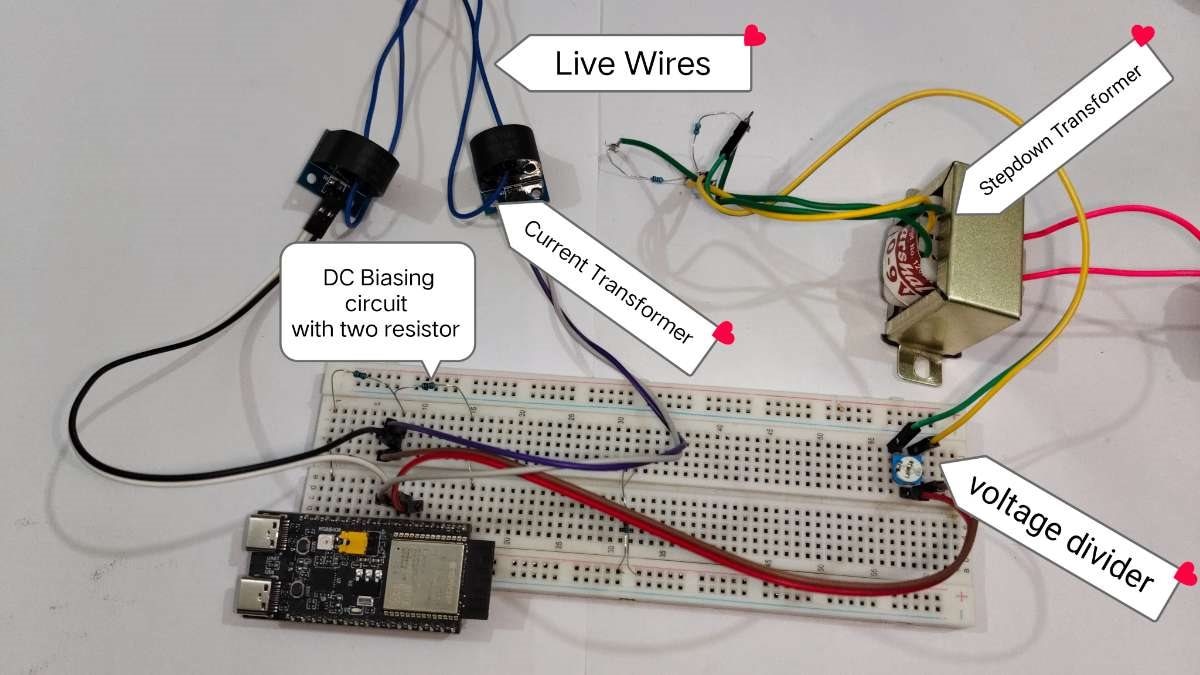
A current transformer and stepdown transformer is connected to ESP32 C6 with
The circuit is very simple, A step-down transformer output is connected to voltage divider (potentiometer) to reduce the voltage, which then feeds to DC biasing network—using two resistors to lift the AC wave to 1.65V—before entering the ESP32's analog pin.
Simultaneously, a Current Transformers (CT) clamps around the live wire to induce a signal representing the load current. This CT output is passed through a similar DC biasing circuit to shift the AC signal above 0V making it compatible for ESP32's analog analog measurement.
Testing with Low-Voltage
Testing the device control with smartphone and physical switch
Webpage config video
The webpage required first time configuration, by default it uses name like room 1,2,3... and switch 1,2,3.....
user can change the name and icon whenever they wants.
Designing the PCB
while the prototype functioned, it was still just a bulky bench setup wired on a breadboard. To make it compact, integrate better power management, and add AC dimming capabilities, the next logical step was designing a custom PCB.
Controlling AC mains with TRIACs across multiple channels requires microsecond-level timing precision to fire relative to the AC zero-crossing point. The ESP chip managing the wireless connection couldn't handle the ESP-NOW mesh network and execute strict hardware timer interrupts at the same time without dropping packets or flickering the lights.
To solve this processing bottleneck, We used a dual-chip architecture: the ESP handles the network, while a dedicated microcontroller (STM32F103)acts as the hardware manager.
PCB Hardware explanation
1. Zero-Cross Detection (ZCD) Circuit
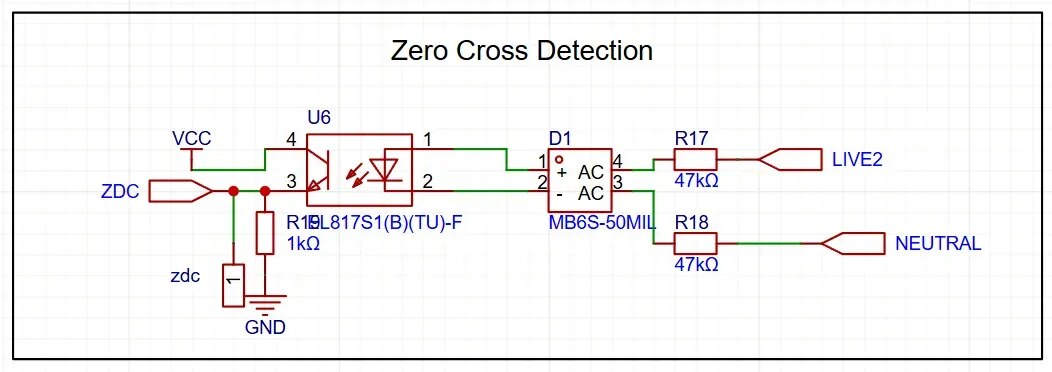
To dim an AC load, the microcontroller must know exactly when the AC sine wave crosses zero volts.
The mains AC is converted to pulsating DC using an MB6S bridge rectifier.
The pulsating DC passes through high-wattage current-limiting resistors (47kΩ) into an EL817 optocoupler.
Every time the AC voltage drops to zero, the optocoupler briefly turns off, sending a precise pulse to the STM32's ZCD pin. This pulse acts as the metronome for the entire dimming operation.
2. High-voltage Control and Isolation
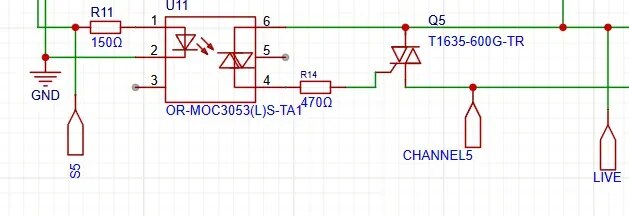
Optoisolation: The MCU is isolated from the mains voltage using MOC3053 random-phase optocouplers. These are triggered by a low 5mA current, safely driven directly from the STM32's PB12, PB13, PB14, PB15, and PA8 pins.
Power Switching: It has high-power (16-Amp) T1635 snubberless triacs that handle the physical switching of the AC load, driven by the optocouplers through 470Ω gate resistors and A1 connects directly to live and A2 connects to the channel terminal for connecting appliances.
3. Power Supply and Noise Filtering
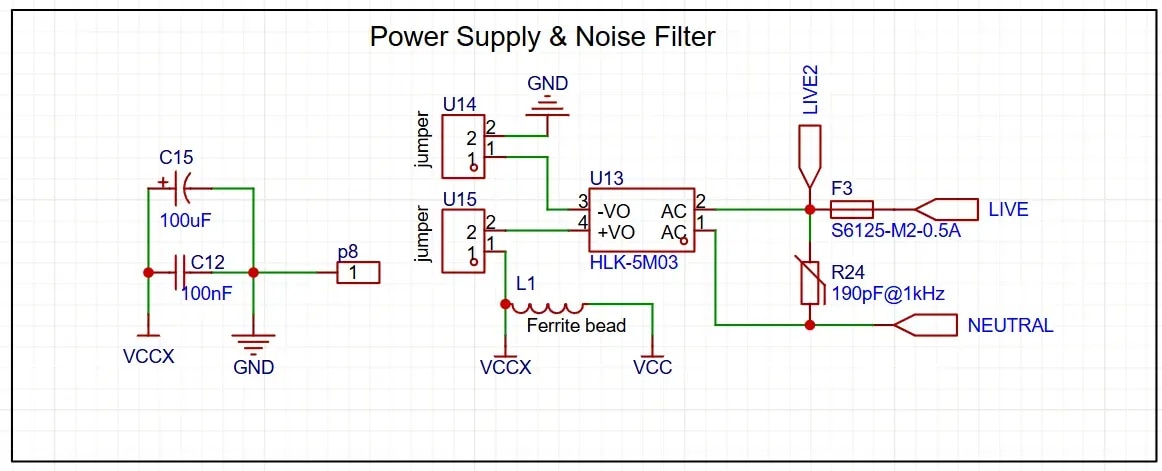
An HLK-5M03 step-down module is used to convert 220V AC directly to the 3.3V DC needed for the MCU and logic components.
Input Protection: The AC input line has a fuse (0.5A) and a mov 10D471 to protect the board against short circuits or catastrophic load failures.
Noise Filter: The 3.3v side it uses Pi Filter that has 100uF, 100nF capacitor and 150mΩ 1A 60Ω@100MHz Ferrite Bead and 10uF,100nF capacitor after Ferrite Bead to suppress the noise.
5. Interface & Connectivity

Analog/Digital Inputs: Pins A1 to A5 are for controlling the channels, you can use Switches to turn ON/OFF or rotary switches can be used for dimming purpose.
UART and I2C: PA9 (TX), PA10 (RX) and PB6 (SCL) and PB7 (SDA) are exposed for debugging, serial firmware flashing or to receive digital dimming commands from ESP8266.
How the dimming/switching Works
1. Syncing: The ZCD circuit detects the AC zero-crossing point (100 times a second for 50Hz mains) and triggers an interrupt on the STM32.
2. Calculating Delay: Depending on the desired brightness level (0-100%), the STM32 calculates a delay. For maximum brightness, the delay is nearly 0ms. For 50% brightness, the delay is exactly half of the AC half-cycle (e.g., 5ms for a 50Hz system).
3. Polling: The STM32 uses Timer ISR to check if it is the time to turn on any of five channels.
4. Firing: Once the calculated delay for a specific channel has elapsed, the STM32 sends a brief HIGH signal to the corresponding MOC3053 optoisolator. The optoisolator triggers the gate of the T1635 TRIAC, allowing AC current to flow to the connected load for the remainder of that half-cycle. This process repeats continuously, resulting in a smoothly dimmed output.
Video demonstration
Final Thought:-
On the surface, this might look like a standard smart home setup, but the real value lies under the hood. By building this system from scratch, I was able to engineer a solution that bypasses the limitations and privacy concerns of off-the-shelf gear. It runs entirely locally without cloud dependence, routes its own decentralized mesh network, and utilizes a custom dual-chip PCB to handle five channels of AC dimming in a highly compact footprint. While it retains its DIY roots, the addition of hardware-level timers and cryptographic signatures makes it a highly capable, secure framework built exactly the way I wanted it.


