




Automatic Waste Segregation System using Arduino Uno is a smart automation project developed to automatically separate waste into Metal, Wet, and Dry categories. The system uses sensors and servo motors to identify the type of waste and direct it into the appropriate bin, reducing manual effort and improving waste management efficiency.
The project is built using an Arduino Uno, IR Sensor, Inductive Proximity Sensor, Raindrop Sensor, and Servo Motors. The IR sensor detects the presence of waste, the inductive proximity sensor identifies metallic objects, and the raindrop sensor detects moisture to determine whether the waste is wet or dry. Based on the sensor readings, Arduino controls the servo motors to open the corresponding flaps and guide the waste into the correct bin.
This project demonstrates the practical application of embedded systems, sensor interfacing, and automation in smart waste management and environmental sustainability.
Components Used-
| Sr. No. | Component Name | Quantity |
|---|---|---|
| 1 | Arduino Uno | 1 |
| 2 | IR Sensor | 1 |
| 3 | Inductive Proximity Sensor | 1 |
| 4 | Raindrop Sensor Module | 1 |
| 5 | SG90 Servo Motor | 2 |
| 6 | Breadboard | 1 |
| 7 | Jumper Wires | As Required |
| 8 | USB Cable / Power Supply | 1 |
| 9 | Cardboard Sheet (Model Structure) | As Required |
| 10 | Adhesive/Glue/Tape | As Required |
Steps to Build the Project
Step 1: Design the Model
- Designed a waste segregation system with three bins: Metal, Wet, and Dry.
- Created the structure using cardboard sheets.
.jpg)
Step 2: Assemble the Mechanical Structure
- Built the inclined ramp.
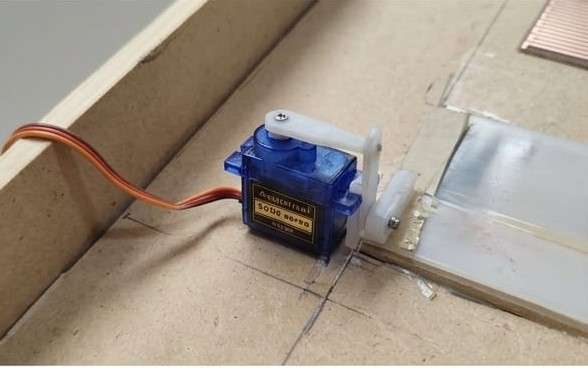
- Installed flaps above the bins.
- Mounted servo motors to control the flaps.
Step 3: Sensor Installation
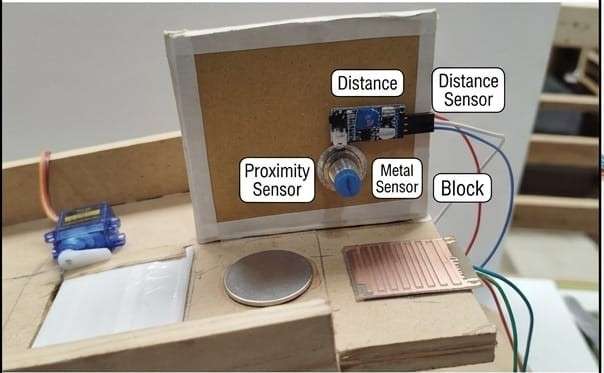
- Mounted the IR sensor at the top for object detection.
- Installed the inductive proximity sensor for metal detection.
Fixed the raindrop sensor for wet waste detection.
Step 4: Circuit Connections
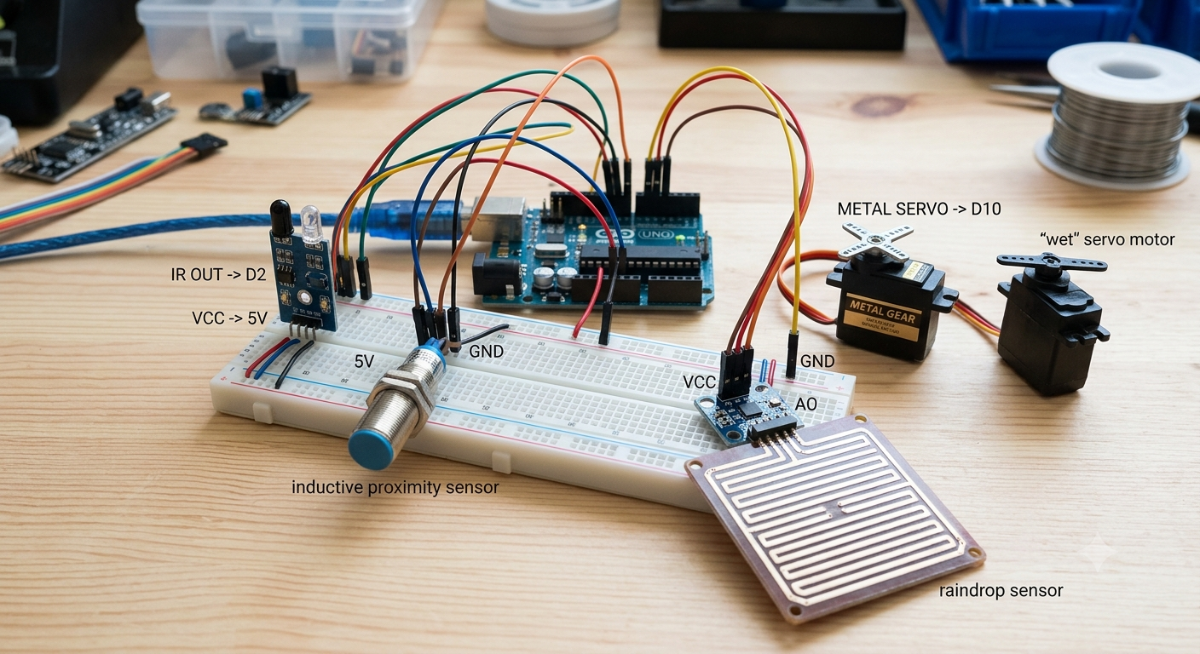
- Connected all sensors and servo motors to Arduino Uno.
Connected power supply and jumper wires.
Step 5: Programming
- Wrote Arduino code for sensor reading and servo control.
Uploaded the code using Arduino IDE.
/*
Automatic Waste Segregator
FIX: Sensor window added → metal/wet can be detected after IR triggers
Pin Mapping:
IR_SENSOR_PIN → D2
METAL_SENSOR_PIN → D3
RAINDROP_PIN → A0
SERVO_WET_PIN → D9
SERVO_METAL_PIN → D10
SERVO_DRY_PIN → D11
BUZZER_PIN → D8
*/
#include <Servo.h>
// --- Pins ---
const int IR_SENSOR_PIN = 2;
const int METAL_SENSOR_PIN = 3;
const int RAINDROP_PIN = A0;
const int SERVO_WET_PIN = 9;
const int SERVO_METAL_PIN = 10;
const int SERVO_DRY_PIN = 11;
const int BUZZER_PIN = 8;
// --- Settings ---
const int WET_THRESHOLD = 600;
const int OPEN_ANGLE = 90;
const int CLOSE_ANGLE = 0;
const unsigned long FLAP_DELAY = 2000; // 3 sec flap open time
const unsigned long SENSING_TIME = 1000; // 2 sec window to detect wet/metal
// --- Servo objects ---
Servo servoWet;
Servo servoMetal;
Servo servoDry;
void setup() {
Serial.begin(9600);
pinMode(IR_SENSOR_PIN, INPUT);
pinMode(METAL_SENSOR_PIN, INPUT);
pinMode(BUZZER_PIN, OUTPUT);
servoWet.attach(SERVO_WET_PIN);
servoMetal.attach(SERVO_METAL_PIN);
servoDry.attach(SERVO_DRY_PIN);
closeAll();
Serial.println("System Ready...");
}
void loop() {
if (!isIRDetected())
return;
Serial.println("IR Detected!");
activateBeep();
delay(200);
bool wet = false;
bool metal = false;
unsigned long detectStart = millis();
//  Keep checking sensors for 2 seconds
while (millis() - detectStart < SENSING_TIME) {
int wetValue = analogRead(RAINDROP_PIN);
wet = (wetValue < WET_THRESHOLD);
metal = isMetalDetected();
Serial.print("Raindrop:");
Serial.print(wetValue);
Serial.print(" Metal:");
Serial.println(metal);
if (wet || metal) break;
}
if (wet) {
Serial.println("Wet Waste Confirmed");
openWet();
}
else if (metal) {
Serial.println("Metal Waste Confirmed");
openMetal();
}
else {
Serial.println("Dry Waste Confirmed");
openDry();
}
delay(FLAP_DELAY);
closeAll();
}
// --- Sensor Functions ---
bool isIRDetected() {
return digitalRead(IR_SENSOR_PIN) == LOW; // Active LOW
}
bool isMetalDetected() {
return digitalRead(METAL_SENSOR_PIN) == HIGH;
}
// --- Actions ---
void activateBeep() {
digitalWrite(BUZZER_PIN, HIGH);
delay(150);
digitalWrite(BUZZER_PIN, LOW);
}
void openWet() {
servoWet.write(OPEN_ANGLE);
activateBeep();
}
void openMetal() {
servoMetal.write(OPEN_ANGLE);
activateBeep();
}
void openDry() {
servoDry.write(OPEN_ANGLE);
activateBeep();
}
void closeAll() {
servoWet.write(CLOSE_ANGLE);
servoMetal.write(CLOSE_ANGLE);
servoDry.write(CLOSE_ANGLE);
digitalWrite(BUZZER_PIN, LOW);
}
Step 6: Testing and Calibration
- Tested metal, wet, and dry waste separately.
- Adjusted sensor sensitivity and servo angles.
VIDEO -
2. Circuit Connection Details
Add a table like this:
| Component | Arduino Pin |
|---|---|
| IR Sensor OUT | D2 |
| Inductive Sensor OUT | D3 |
| Raindrop Sensor OUT | A0 |
| Metal Servo Signal | D10 |
| Wet Servo Signal | D9 |
| VCC | 5V |
| GND | GND |


