



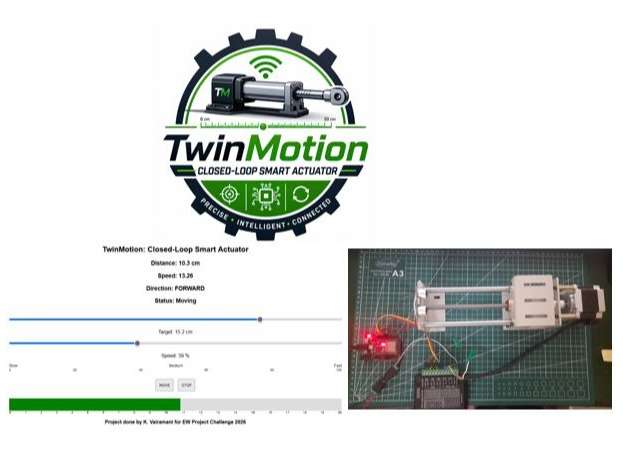
TwinMotion: Closed-Loop Smart Actuator
In modern automation systems, achieving precise and controlled linear motion is a major challenge, especially in applications requiring high accuracy, reliability, and real-time monitoring. Conventional actuator systems often operate in open-loop mode, where there is no feedback mechanism to verify the actual position of the actuator. This leads to issues such as position errors, instability, lack of synchronization, and inefficient performance.
Additionally, most low-cost systems lack user-friendly interfaces, remote monitoring capabilities, and dynamic speed control, making them unsuitable for smart and industrial applications. There is a need for a system that can continuously monitor actuator position, adjust motion intelligently, and provide real-time feedback to the user.
Therefore, the problem is to design and develop a cost-effective, smart actuator system that integrates real-time position sensing, closed-loop control, adjustable speed, and wireless monitoring. The system should ensure accurate positioning within a defined range (mostly between 4–16 cm), maintain stable direction control, and provide clear status updates such as Idle, Moving, and Target Reached.
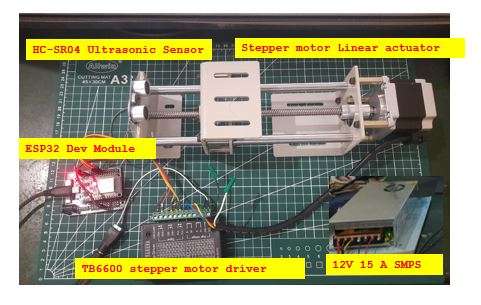
This project aims to solve these challenges by implementing a sensor-based closed-loop control system using ESP32, stepper motor, and ultrasonic feedback, along with a digital twin dashboard with login authentication for real-time visualization and control. Used ultrasonic sensor to take feed back while actuator is in motion. The system comprises of ESP32 dev module mounted over an ESP32 expansion board, stepper motor linear actuator (nema23) with 200 mm stroke, HC-SR04 ultrasonic sensor and the linear actuator is powered by a 12V 15A SMPS. Below figure shows the hardware's used in this project.
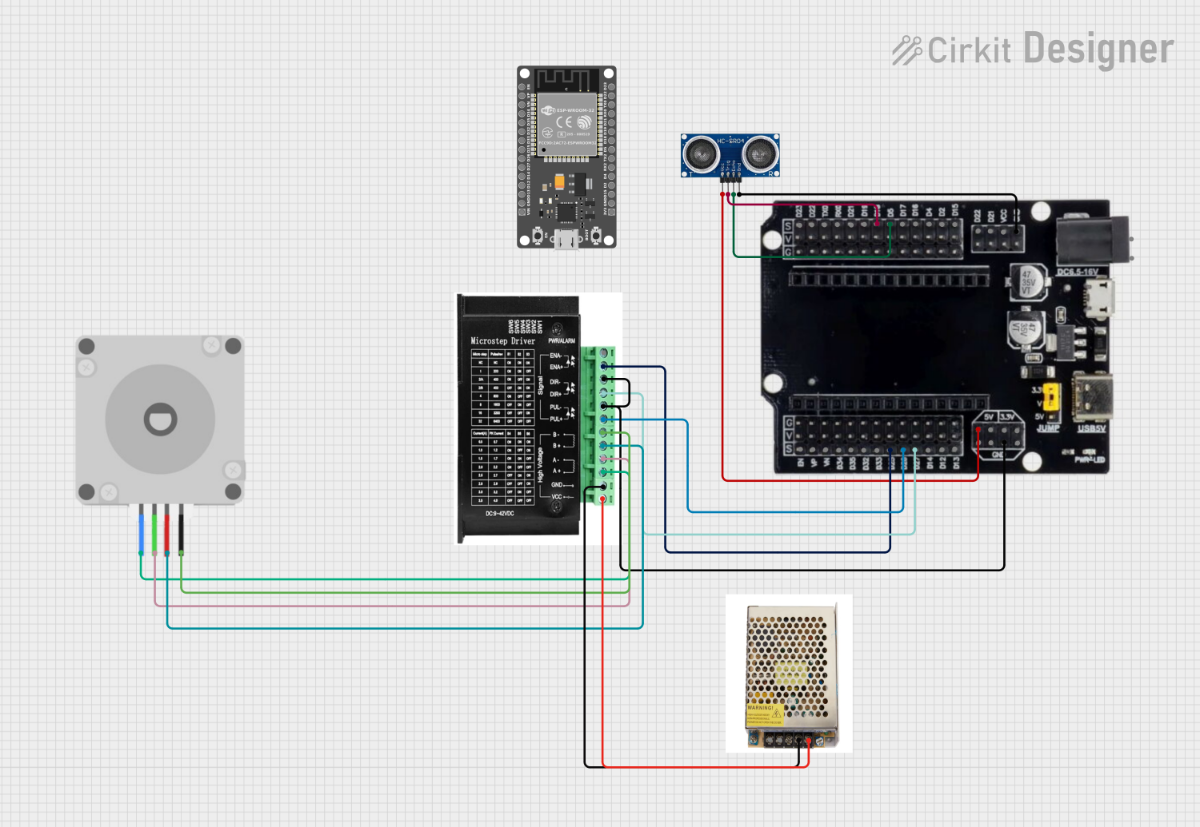
Below figure shows the circuit schematic.
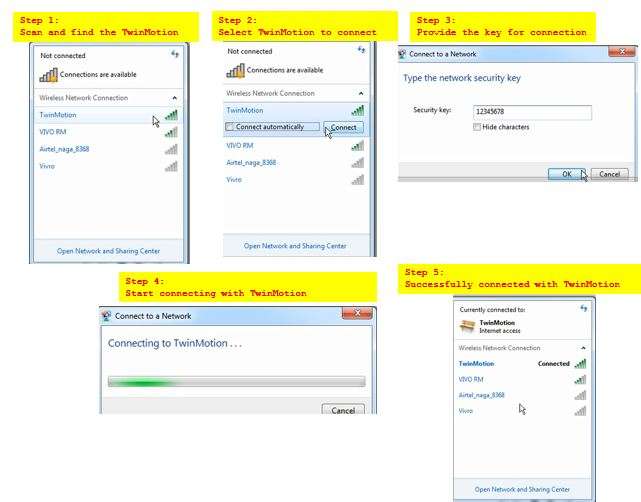
The TwinMotion device is configured with AP mode. so the user has to scan and add this device to his mobile phone/laptop/PC via Wi-Fi. below figure shows how to connect with "TwinMotion".
The software of the TwinMotion: Closed-Loop Smart Actuator system is developed using the ESP32 microcontroller platform, combining embedded programming with a web-based monitoring interface. The core logic is written in Arduino-style C/C++ under Arduino IDE, where the ESP32 generates precise step pulses to control the TB6600 stepper driver for driving the NEMA 23 motor. The system continuously reads real-time distance data from the HC-SR04 ultrasonic sensor, which acts as the feedback mechanism.
The software implements a closed-loop control algorithm by comparing the current position (measured distance) with the user-defined target position. Based on the calculated error, the ESP32 determines the direction of movement and adjusts the actuator accordingly. Speed control is achieved by varying the time interval between step pulses, allowing smooth and controlled motion.
A built-in web server hosted on the ESP32 provides a digital twin dashboard, enabling users to set target position, adjust speed, and monitor parameters such as distance, direction, and system status (Idle, Moving, Reached) in real time. The system also includes authentication for secure access. Overall, the software ensures precise, responsive, and intelligent actuator control.
/**********************************************************************
 * Project Name : TwinMotion - Smart Linear Actuator System
 * Description  :
 * This project implements a sensor-based closed-loop control system
 * using ESP32, TB6600 stepper driver, NEMA 23 motor, and HC-SR04 sensor.
 *
 * The actuator position is controlled based on real-time distance
 * feedback from the ultrasonic sensor. The system compares the
 * current position with the target position and adjusts motor movement.
 *
 * Features:
 *  - Direction control (Forward / Reverse)
 *  - Speed control using pulse delay
 *  - Real-time position feedback (HC-SR04)
 *  - Status detection (IDLE / MOVING / REACHED)
 *
 * Hardware Used:
 *  - ESP32 Dev Module
 *  - TB6600 Stepper Motor Driver
 *  - NEMA 23 Stepper Motor (10 Kg-cm torque)
 *  - HC-SR04 Ultrasonic Sensor
 *  - 12V 15A SMPS
 *
 * Author       : K. Vairamani
 * Date         : 29 JUNE 2026
 * /

#include <WiFi.h>
#include <WebServer.h>

// ---------------- WIFI ----------------
const char* ssid = "TwinMotion";
const char* password = "12345678";

// ---------------- LOGIN ----------------
const char* www_username = "admin";
const char* www_password = "admin123";

WebServer server(80);

// ---------------- Stepper motor driver PINS ----------------
#define STEP_PIN 26
#define DIR_PIN 27
#define ENA_PIN 25
// ---------------- Ultrasonic sensor PINS ----------------
#define TRIG_PIN 5
#define ECHO_PIN 18

// ---------------- VARIABLES ----------------
float currentPosition = 0;
float lastPosition = 0;
float targetPosition = 0;

bool motorRunning = false;

String motorStatus = "Idle";
String direction = "STOP";

// -------- SPEED CONTROL --------
volatile int stepInterval = 800;

hw_timer_t *timer = NULL;
portMUX_TYPE timerMux = portMUX_INITIALIZER_UNLOCKED;

// ---------------- TIMER ISR ----------------
void IRAM_ATTR onStep() {
  portENTER_CRITICAL_ISR(&timerMux);
  if (motorRunning) {
    digitalWrite(STEP_PIN, !digitalRead(STEP_PIN));
  }
  portEXIT_CRITICAL_ISR(&timerMux);
}

// ---------------- HTML ----------------
String webpage = R"rawliteral(
<!DOCTYPE html>
<html>
<head>
<title>TwinMotion</title>
<style>
body { font-family: Arial; text-align: center; }
.slider { width: 80%; }
.bar { width: 80%; height: 40px; background: #ddd; margin: auto; }
.fill { height: 100%; background: green; width: 0%; }
.scale { width: 80%; margin: auto; display:flex; justify-content:space-between; font-size:10px;}
button { padding: 10px; margin: 5px; }
</style>
</head>

<body>

<h2>TwinMotion: Closed-Loop Smart Actuator</h2>

<h3>Distance: <span id="dist">0</span> cm</h3>
<h3>Speed: <span id="speed">0</span></h3>
<h3>Direction: <span id="dir">STOP</span></h3>
<h3>Status: <span id="status">Idle</span></h3>

<br>

<input type="range" min="0" max="20" step="0.1" value="0" id="pos" class="slider">
<p>Target: <span id="val">0</span> cm</p>

<input type="range" min="1" max="100" value="50" id="spd" class="slider">
<p>Speed: <span id="spdVal">50</span> %</p>

<div style="width:80%; margin:auto; display:flex; justify-content:space-between; font-size:12px;">
<span>Slow</span>
<span>Medium</span>
<span>Fast</span>
</div>

<div style="width:80%; margin:auto; display:flex; justify-content:space-between; font-size:10px;">
<span>0</span><span>20</span><span>40</span><span>60</span><span>80</span><span>100</span>
</div>

<br>

<button onclick="move()">MOVE</button>
<button onclick="stopMotor()">STOP</button>

<br><br>

<div class="bar">
  <div class="fill" id="fill"></div>
</div>

<div class="scale" id="scale"></div>

<p><b>Project done by K. Vairamani for EW Project Challenge 2026</b></p>

<script>

// ELEMENTS
let dist = document.getElementById("dist");
let speed = document.getElementById("speed");
let dir = document.getElementById("dir");
let status = document.getElementById("status");
let fill = document.getElementById("fill");
let spd = document.getElementById("spd");
let spdVal = document.getElementById("spdVal");

// TARGET SLIDER
let s = document.getElementById("pos");
let v = document.getElementById("val");
v.innerHTML = s.value;
s.oninput = () => v.innerHTML = s.value;

// SPEED DISPLAY
spdVal.innerHTML = spd.value;
spd.oninput = () => spdVal.innerHTML = spd.value;

// SCALE 0–20 cm
let sc = document.getElementById("scale");
for(let i=0;i<=20;i++){
 let sp=document.createElement("span");
 sp.innerHTML=i;
 if(i%5==0) sp.style.fontWeight="bold";
 sc.appendChild(sp);
}

// BUTTONS
function move(){
 fetch(`/move?pos=${s.value}&spd=${spd.value}`);
}

function stopMotor(){
 fetch("/stop");
}

// LIVE DATA
setInterval(()=>{
 fetch("/data")
 .then(r=>r.json())
 .then(d=>{
   dist.innerHTML = d.distance.toFixed(1);
   speed.innerHTML = d.speed.toFixed(2);
   dir.innerHTML = d.direction;
   status.innerHTML = d.status;
   fill.style.width = (d.position/20)*100 + "%";
 });
},300);

</script>

</body>
</html>
)rawliteral";

// ---------------- DISTANCE ----------------
float readDistance() {
  digitalWrite(TRIG_PIN, LOW);
  delayMicroseconds(2);
  digitalWrite(TRIG_PIN, HIGH);
  delayMicroseconds(10);
  digitalWrite(TRIG_PIN, LOW);

  long duration = pulseIn(ECHO_PIN, HIGH, 20000);
  float dist = duration * 0.034 / 2;

  if(dist < 2 || dist > 25) return currentPosition;
  return dist;
}

// ---------------- MOTOR LOGIC ----------------
void handleMotor() {

  static unsigned long lastSensor = 0;

  if (millis() - lastSensor > 100) {
    lastSensor = millis();

    lastPosition = currentPosition;
    currentPosition = readDistance();
  }

  if (!motorRunning) return;

  float error = targetPosition - currentPosition;

  if (abs(error) < 0.3) {
    motorRunning = false;
    motorStatus = "Reached";
    direction = "STOP";
    digitalWrite(ENA_PIN, HIGH);
    return;
  }

  motorStatus = "Moving";

  if (error > 0) {
    direction = "FORWARD";
    digitalWrite(DIR_PIN, HIGH);
  } else {
    direction = "REVERSE";
    digitalWrite(DIR_PIN, LOW);
  }
}

// ---------------- ROUTES ----------------
void handleRoot(){
  if(!server.authenticate(www_username, www_password))
    return server.requestAuthentication();
  server.send(200,"text/html",webpage);
}

void handleMove(){
  if(!server.authenticate(www_username, www_password))
    return server.requestAuthentication();

  targetPosition = server.arg("pos").toFloat();
  int spd = server.arg("spd").toInt();

  stepInterval = map(spd, 1, 100, 2000, 200);
  timerAlarmWrite(timer, stepInterval, true);

  motorRunning = true;
  motorStatus = "Moving";

  digitalWrite(ENA_PIN, LOW);

  server.send(200,"text/plain","OK");
}

void handleStop(){
  motorRunning = false;
  motorStatus = "Stopped";
  direction = "STOP";
  digitalWrite(ENA_PIN, HIGH);
  server.send(200,"text/plain","Stopped");
}

void handleData(){
  float speedVal = abs(currentPosition - lastPosition) * 20;

  String json = "{";
  json += "\"distance\":" + String(currentPosition) + ",";
  json += "\"speed\":" + String(speedVal) + ",";
  json += "\"direction\":\"" + direction + "\",";
  json += "\"status\":\"" + motorStatus + "\",";
  json += "\"position\":" + String(currentPosition);
  json += "}";

  server.send(200,"application/json",json);
}

// ---------------- SETUP ----------------
void setup(){

  pinMode(STEP_PIN,OUTPUT);
  pinMode(DIR_PIN,OUTPUT);
  pinMode(ENA_PIN,OUTPUT);

  pinMode(TRIG_PIN,OUTPUT);
  pinMode(ECHO_PIN,INPUT);

  Serial.begin(115200);

  WiFi.softAP(ssid,password);

  Serial.println();
  Serial.print("Open: http://");
  Serial.println(WiFi.softAPIP());

  timer = timerBegin(0, 80, true);
  timerAttachInterrupt(timer, &onStep, true);
  timerAlarmWrite(timer, stepInterval, true);
  timerAlarmEnable(timer);

  server.on("/",handleRoot);
  server.on("/move",handleMove);
  server.on("/stop",handleStop);
  server.on("/data",handleData);

  server.begin();
}

// ---------------- LOOP ----------------
void loop(){
  server.handleClient();
  handleMotor();
}
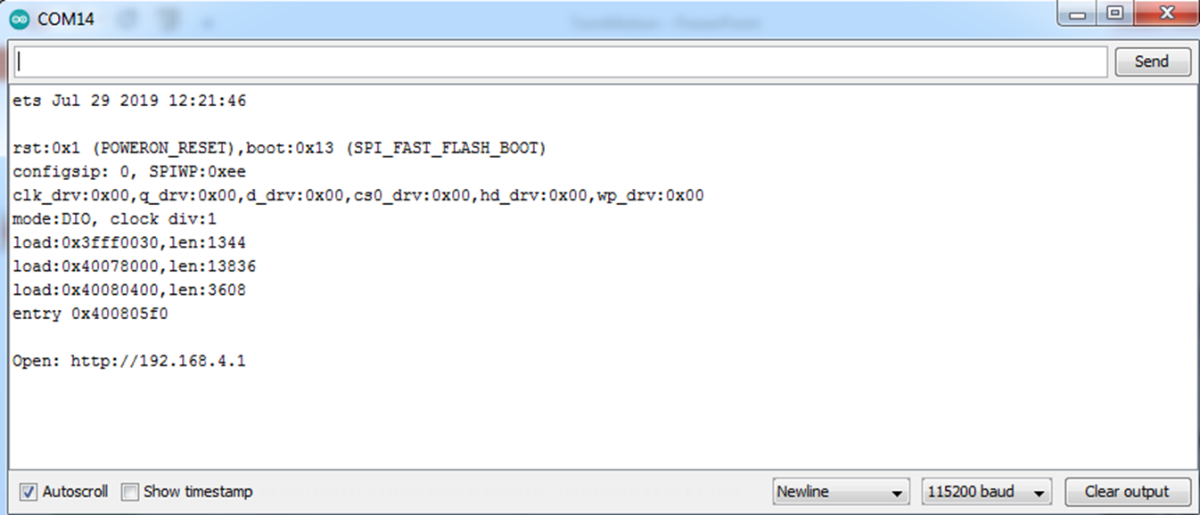
once after flashing the code on the board, in serial window user can able to see the IP address as shown in figure below and could i used for communication from the host devices.
The web dashboard here had the IP 192.168.4.1. when the user enters this IP on the web browser of PC/Laptop/Mobile phone it will ask for the username and password to ensure authorized user. on the web dash board user could find two sliders one to set the target range the actuator to move, and the speed slider to set the step size movement in scale between 1 to 100. the dashboard will show the distance between the sensor and actuator moving part, also shows the speed of movement and direction (forward and reverse). The user has to set the target and hit the "MOVE" button, then the linear actuator starts to move and ultrasonic sensor starts to compute distance, speed and direction. user can stop the actuator movement by hitting the "STOP" button at any time during the movement. User can also see the status as idle or moving or reached state of the actuator. in the mean time a scale on the bottom of the dash board shows the Digitaltwin of the linear actuator. as shown in figure below.
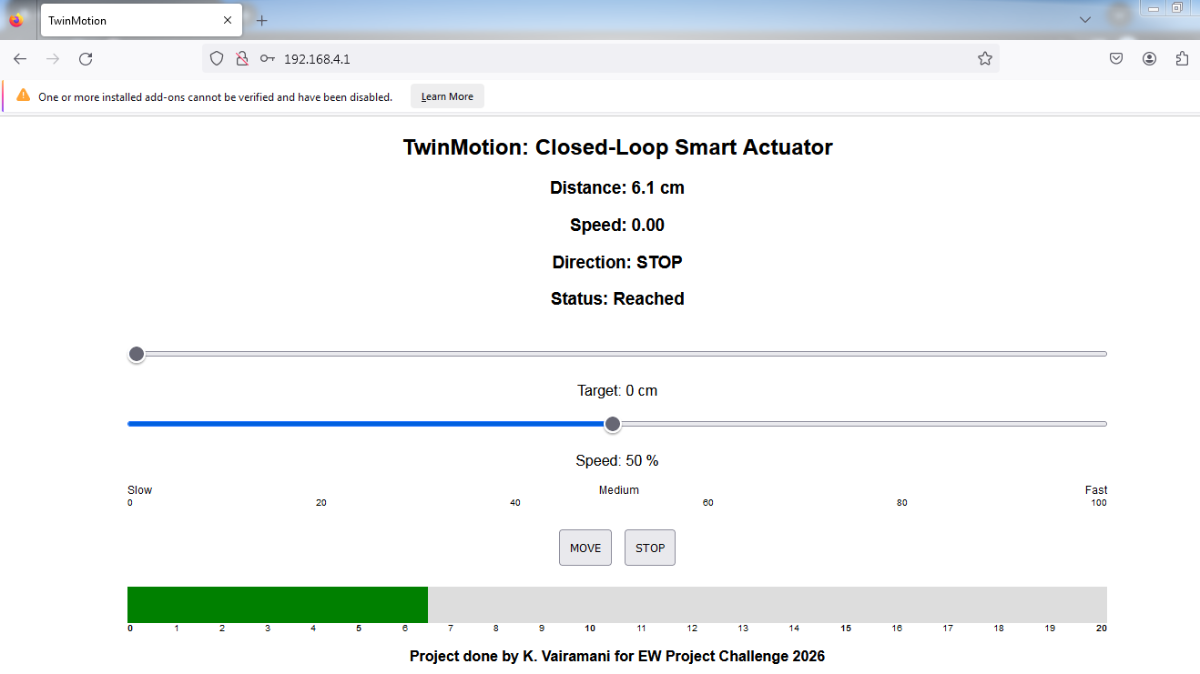
The entire system is controlled through a web dashboard, where the user can set position and speed using an intuitive slider interface. The actuator responds in real time, and all motion is continuously monitored.
A key highlight of our project is the digital twin — a virtual representation of the actuator that mirrors real-time movement. This allows users to visualize system behavior remotely and enhances monitoring and control.
Additionally, we calculate speed dynamically and detect motion states such as moving or stationary, making the system more intelligent and responsive. TwinMotion demonstrates how traditional actuator systems can be transformed into smart, connected, and interactive cyber-physical systems using web technologies and real-time feedback.


