




1. Project Overview
.png)
SPARC is a wearable assistive communication system designed to help Deaf and speech-impaired users interact more independently in real-world settings. The project combines computer vision, edge AI, wearable electronics, speech output, and a compact OLED interface to turn sign language gestures into meaningful communication.
The current project focuses on the spectacle-mounted fitment prototype. The broader project vision includes a modular assistive reality ecosystem, but the practical build presented here is centered on a wearable device that can be demonstrated, tested, and iterated quickly.
2. Why This Project Matters
.png)
.png)
In many daily situations, the user has no interpreter nearby. Existing tools often solve only one part of the problem: either speech-to-text, or sign recognition, or a phone-based assistive app that is not truly wearable. That creates friction in schools, hospitals, counters, workplaces, and public spaces.
SPARC is built around a more complete idea: a communication companion that sits on the user, reads gestures, speaks responses, and gives compact visual feedback without depending on a cloud connection.
3. Problem Statement
- One-way translation tools do not support natural conversation.
- Bulky glove-based systems are uncomfortable and difficult to scale.
- Cloud-dependent apps create latency, privacy, and connectivity issues.
- Most solutions do not support a wearable, everyday form factor.
- Safety and situational awareness are often missing entirely.
The result is that users still need extra help for routine communication. A solution only becomes useful when it is fast, portable, private, and comfortable enough to wear for long periods.
4. Existing Solutions and Their Limitations
The current market has sign-language apps, captioning tools, camera-based demos, and glove systems. Each of them solves a narrow piece of the puzzle, but the overall experience is still fragmented.
- Glove systems: often accurate only in controlled environments, with poor comfort and maintenance issues.
- Mobile apps: easy to install, but not always hands-free or suitable for continuous interaction.
- Cloud platforms: powerful but slower, dependent on internet quality, and less private.
- Screen-only prototypes: useful for research, but weak as a daily wearable product.
This is why the project was framed as a wearable assistive reality system instead of a plain translation app. The hardware form factor is part of the innovation, not just a container for software.
5. Why We Chose a Wearable Approach
A wearable system makes the interaction feel immediate. The user does not need to hold a phone, open an app, or connect extra accessories every time. The device is always ready, and that matters in real-world communication.
- Hands-free use during conversation.
- Faster access to feedback through the OLED interface.
- More natural user experience in public settings.
- Better privacy because processing can stay on-device.
- A modular fitment can be adapted to different frames and future generations.
6. Concept Development Journey
The concept evolved from a basic sign-language recognition idea into a full assistive workflow. The team did not stop at gesture classification. It grew into a communication companion with audio output, visual overlays, modular hardware, and a live web demo.
The strongest design decision was to keep the prototype simple enough to run reliably, while still showing a future-ready architecture.
.png)
7. Design Thinking Process
The project follows a simple but effective human-centered design path.
1. Empathize: understand how sign-language users experience communication barriers.
2. Define: focus on a wearable, low-latency, offline assistive solution.
3. Ideate: combine gesture recognition, speech output, OLED feedback, and modular hardware.
4. Prototype: build a spectacle-mounted fitment and test it in live conditions.
5. Evaluate: measure accuracy, latency, comfort, and reliability.
8. Project Objectives
- Recognize sign gestures in real time.
- Convert gestures into readable text and speech.
- Provide visual feedback on a wearable OLED display.
- Operate with low latency and offline-first behavior.
- Support modular development and future expansion.
- Demonstrate a real wearable prototype, not just a software concept.
9. Proposed Solution
SPARC is an AI-powered wearable assistive reality system that uses a camera, a small on-device compute layer, machine learning models, and a wearable display to assist communication. The system detects gestures, interprets the result, and outputs the information through both speech and text.
In the current fitment-focused build, the device is presented as a spectacle-mounted unit with a compact display and camera alignment that can be worn during live demonstrations.
.png)

User wearing the spectacle-mounted fitment prototype
10. Key Innovations
- Wearable first: the form factor is designed for daily use.
- Offline edge processing: the system is not built around constant cloud dependence.
- Multi-module AI stack: gesture recognition, emotion detection, and optional object awareness.
- OLED-driven feedback: compact visual output without needing a phone screen.
- Code modularity: the repository is split into services, models, camera, gestures, vision, and test modules.
11. System Overview
.png)
High-level architecture of the wearable assistive communication platform
At a high level, the workflow is simple: the camera captures the user's gesture, the software extracts landmarks and classifies the sign, the result is converted into sentence-level output, and the OLED/audio services present it to the user and the listener.
The design is intentionally modular. That means the camera, output display, models, and services can be upgraded independently.
12. Hardware Architecture
| Component | Role in the system |
| Raspberry Pi 4 | Main local compute platform for inference and orchestration. |
| USB camera | Captures hand and body gestures from the wearable viewpoint. |
| Waveshare OLED display | Presents compact captions and system feedback. |
| Microphone module | Optional speech input path for voice-based interaction. |
| Bluetooth audio / speaker | Converts text to speech for external listeners. |
| Li-ion / Li-Po battery | Portable power for the fitment prototype. |
| Wearable spectacle frame | Mechanical mounting platform for the assistive unit. |
13. Working Principle
1. The user wears the spectacle-mounted unit.
2. The camera streams live frames to the recognition pipeline.
3. Hand landmarks and optional face or pose cues are extracted.
4. The model classifies the sign or gesture.
5. The result is built into a readable word or sentence.
6. The display shows the text, and the audio service speaks it out.
7. The user can continue the conversation without switching devices.
14. End-to-End Workflow
.png)
End-to-end gesture-to-speech and gesture-to-text workflow
15. Wearable Design
The fitment was chosen because it feels closer to an everyday assistive product. The camera and display sit on the wearable frame, which helps keep the prototype compact. The shape, alignment, and cable routing matter just as much as the AI model.
.png)
.png)
.png)
SPARC - CAD Diagram
16. Hardware Components
| Quantity | Component | Purpose |
| 1 | Raspberry Pi 4 | Main local inference and control unit |
| 1 | USB Camera | Gesture capture |
| 1 | Waveshare OLED display | Wearable text output |
| 1 | Microphone module | Speech input |
| 1 | Bluetooth audio / speaker | Voice output |
| 1 | Battery pack | Portable power |
| 1 | Spectacle frame / fitment | Wearable enclosure |
| 1 | Optional IMU module | Future motion/safety extension |
17. Hardware Assembly Process
The prototype was assembled in a practical engineering sequence instead of a cosmetic sequence. First came the sensor placement, then display alignment, then compute integration, and only after that did the team focus on cable management and usability.
1. Mount the display on the spectacle frame and confirm visibility from the user angle.
2. Fix the camera so that the hands remain in the field of view during natural movement.
3. Place the compute unit and route the cables to reduce strain on the frame.
4. Connect the output path for audio and verify that speech generation is clear.
5. Run live tests and adjust the alignment until the system feels natural to wear.
18. Prototype Development Journey
SPARC was developed through multiple iterations, beginning with basic hand-landmark detection and progressing to a wearable assistive communication system. Initial efforts focused on achieving reliable sign-language recognition using computer vision and machine learning.
The next phase involved integrating a wearable OLED display and optimizing the recognition pipeline for real-time performance. Multiple hardware configurations were tested to improve comfort, visibility, and system stability.
Finally, the complete system was validated through live demonstrations, successfully translating gestures into meaningful text and wearable feedback in real time.
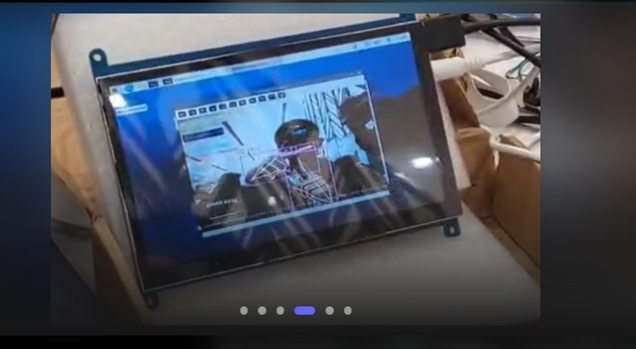
Live gesture recognition shown on the wearable prototype during testing
.png)
Development table showing the processing laptop, display, and hardware wiring during integration
.png)
Hand landmark recognition view used during sign-language classification
19. Software Architecture
.png)
Software architecture and module interactions inside the SPARC repository
20. Source Code Structure
The repository is not flat. It is deliberately split into runtime code, model assets, driver libraries, and test/debug scripts. That structure makes it easier to explain, debug, and extend.
Repo Link: https://github.com/Avishkar-byte/SPARC-Smart-Perception-Assistive-Reality-Companion.git
SPARC-Smart-Perception-Assistive-Reality-Companion/
├── run.py
├── requirements.txt
├── README.md
├── RFC_MODEL_2_0_9_modes.pkl
├── RFC_MODEL_3_A_Z_modes.pkl
├── yolov8n.pt
├── weights/
├── SPARC/
│   ├── main.py
│   ├── core/
│   ├── services/
│   ├── gestures/
│   ├── emotions/
│   ├── vision/
│   ├── cameras/
│   ├── config/
│   ├── isl_recognition/
│   └── utils/
├── Face_Recognition/
│   ├── src/
│   ├── model.h5
│   └── imgs/
├── lib/
│   └── waveshare_OLED/
└── X/
    ├── test_*.py
    └── fix_*.md
21. Repository Walkthrough: run.py and Root Assets
run.py is the clean launch point. It simply appends the repository path to Python's import path and calls SPARC.main.main().
- run.py: launch script.
- requirements.txt: Python dependency list.
- RFC_MODEL_2_0_9_modes.pkl: trained classifier for number mode.
- RFC_MODEL_3_A_Z_modes.pkl: trained classifier for character mode.
- yolov8n.pt / weights/yolov8n.pt: object detection weights used by the optional vision module.
22. Repository Walkthrough: SPARC Package
- SPARC/main.py: interactive runtime orchestrator and user flow control.
- SPARC/services/display.py: OLED wrapper with rotation, scaling, fallback logging, and text rendering.
- SPARC/services/audio.py: blocking TTS playback with graceful cleanup.
- SPARC/services/logger.py: consistent timestamped logging.
- SPARC/core/model_handler.py: model loading and prediction wrapper for ISL and ASL assets.
- SPARC/gestures/gesture_recognizer.py: hand detection, sentence building, emotion integration, and output routing.
- SPARC/emotions/emotion_detector.py: face-based emotion classification using a pre-trained CNN and Haar cascade.
- SPARC/vision/object_detection.py: optional YOLOv8 scene/object description and distance-aware summarization.
- SPARC/cameras/realsense_manager.py: camera abstraction that prefers RealSense and falls back to USB camera.
- SPARC/config/settings.py and config_io.py: central constants and persisted display/audio calibration.
- SPARC/isl_recognition/: alternate gesture pipeline, geometry helpers, and visualizer utilities.
- SPARC/utils/geometry.py: landmark distance and angle calculations.
23. Repository Walkthrough: Face_Recognition Module
Face_Recognition is a separate reusable subproject for emotion detection. It contains the dataset preparation script, the model file, and the inference/training script.
- src/dataset_prepare.py: converts FER-2013 CSV into train/test image folders.
- src/emotions.py: CNN architecture, training loop, and display mode for facial emotion recognition.
- src/haarcascade_frontalface_default.xml: face detector used before feeding crops into the CNN.
- model.h5: saved emotion classifier used during runtime.
- imgs/accuracy.png: training performance visual used in the module README.
24. Repository Walkthrough: X Folder
The X folder behaves like a development workshop. It contains fixes, test scripts, and investigation tools that were used while stabilizing the camera and object-detection pipeline.
- test_camera_feed.py / test_camera_simple.py / test_cameras.py: camera diagnostics.
- test_both_modes.py: validation across multiple runtime modes.
- test_object_detection_live.py: live YOLO-based scene tests.
- test_realsense.py: RealSense validation script.
- REALSENSE_SETUP.md / REALSENSE_RGB_FIX.md / CAMERA_FIX_SUMMARY.md: troubleshooting notes and integration fixes.
- main_simple.py and backup.py: reduced or fallback runtime versions.
25. Main Execution Flow
The actual startup path is very short but very important.
python run.py
-> imports SPARC.main
-> initializes logging
-> initializes OLED display service
-> initializes audio service
-> selects language mode (ISL or ASL)
-> launches GestureRecognizer
-> enters live recognition loop
-> speaks and displays recognized output
-> cleans up on exit
Inside SPARC/main.py, the code currently uses the USB webcam path for the fitment-focused demo. RealSense and object detection support are present in the codebase.
26. How the Code Works Internally
The code is organized around a few clear responsibilities.
1. Model loading: model_handler loads the correct model based on language mode.
2. Frame capture: camera or webcam frames are read continuously.
3. Feature extraction: the hand detector and geometry utilities convert raw frames into model-friendly features.
4. Inference: the classifier predicts the current gesture or sign.
5. Sentence building: results are accumulated into a readable sentence.
6. Output: display.py renders text on the OLED and audio.py speaks the output.
27. Dataset Collection and Training
The repository contains the runtime models and a separate emotion-training pipeline. For the gesture side, the models are packaged as trained assets. For facial emotion detection, the repo includes the FER-2013 preparation script and CNN training script.
In the emotion module, `dataset_prepare.py` converts the FER-2013 CSV into train and test folders, while `emotions.py` trains a CNN on 48x48 grayscale face crops. This gives the project a complete ML story: data preparation, model training, inference, and deployment.
28. Hand Landmark Detection
Hand landmarks are the most important input representation for the gesture system. Instead of feeding the model raw pixels only, the pipeline derives structured landmark coordinates. That improves consistency across lighting and background changes.
.png)
Landmark-based hand recognition interface used to validate gestures in real time
The geometry helper functions compute distances, angles, and shoulder width normalization. That is a strong engineering choice because it gives the classifier more stable features than raw frames alone.
29. Gesture Recognition Pipeline
Gesture recognition is handled by the GestureRecognizer class. The module uses cvzone hand detection, the trained model handler, and emotion integration to build a live interactive system.
- Detect hands and landmarks from the live frame.
- Normalize and convert the landmark positions into a compact feature set.
- Pass the features to the correct model based on language mode.
- Filter low-confidence results using a threshold.
- Accumulate stable predictions into a sentence.
- Send the sentence to display and audio services.
30. Emotion Recognition Module
The emotion recognition module is a valuable additional layer. It reads the face, detects the region using a Haar cascade, and classifies the expression with a CNN saved as model.h5.
The module focuses on a practical subset of emotions during runtime: Angry, Happy, Neutral, and Sad. This is a smart decision because it keeps the interaction layer simple and readable.
31. OLED Display Module
The display service is a nice engineering detail because it wraps a real Waveshare OLED driver, manages rotation and scaling, and falls back gracefully if hardware is unavailable. That makes the code robust.
.png)
Wearable OLED output showing the system initialization message
The OLED module supports centered bold text, configurable line height, offsets, and display persistence.
32. Audio Module
Audio output is handled by gTTS and local playback through mpg123. The design blocks until speech is finished so the spoken result is not cut off mid-sentence.
- Generate MP3 using gTTS.
- Play the audio using mpg123.
- Clean up temporary files after playback.
- Use short safety delays to avoid truncation.
This is a practical choice for a demo because it keeps the speech output predictable and easy to understand.
33. Vision and Optional Object Detection
The repository also includes an optional object detection and depth-aware vision layer. The module uses YOLOv8 and can work with RealSense or USB camera input through the camera manager abstraction.
In the current fitment, it demonstrates that the project is architected to expand into scene awareness and navigation assistance.
34. GitHub Repository Walkthrough
.png)
.png)
SPARC - GitHub repository screenshot showing the top-level file structure and README
GitHub Repository Link: https://github.com/Avishkar-byte/SPARC-Smart-Perception-Assistive-Reality-Companion
35. How We Built This Project
1. Idea Validation
The project originated from observing the communication difficulties faced by Deaf and speech-impaired individuals in educational institutions and public spaces. The goal was to create a practical solution that could assist users without requiring an interpreter.
2. Requirement Analysis
Key requirements were identified, including real-time gesture recognition, offline operation, wearable form factor, low latency, and user-friendly feedback mechanisms.
3. Hardware Selection
Several hardware configurations were evaluated before selecting a compact setup consisting of a camera module, OLED display, processing unit, audio output system, and spectacle-mounted frame.
4. Dataset Preparation
Gesture samples were collected and organized to represent commonly used signs and communication phrases. Data was cleaned, labeled, and prepared for model training and validation.
5. Model Training & Packaging
Multiple machine learning models were trained and evaluated to achieve reliable recognition performance. The final models were exported and packaged as optimized .pkl and .h5 files for deployment.
6. Software Development
A modular software architecture was developed to separate gesture recognition, display management, audio feedback, and utility services, making the system easier to maintain and expand.
7. Hardware Integration
The electronic components were assembled onto a wearable spectacle-fitment prototype. Special attention was given to display positioning, wiring management, and user comfort.
8. User Interface Development
The OLED interface and audio feedback system were refined to ensure that recognized information could be delivered clearly, quickly, and consistently to the user.
9. Testing & Validation
Extensive testing was performed under different lighting conditions, hand positions, and usage scenarios to evaluate recognition accuracy and system stability.
10. Optimization
Several iterations were carried out to reduce inference time, improve prediction consistency, enhance display readability, and optimize overall system responsiveness.
11. Deployment & Demonstration
The final system was documented, deployed through a web interface, and demonstrated through live testing sessions, showcasing real-time assistive communication capabilities in a wearable form factor.
36. How To Rebuild This Project From Scratch
One of the primary goals behind SPARC was to create a modular and reproducible assistive technology platform. The project has been structured so that students, researchers, and developers can easily recreate, test, and further enhance the system without redesigning the complete architecture.
Hardware Requirements
The following hardware components are required to recreate the wearable prototype:
- Raspberry Pi 4 (or equivalent edge-computing platform)
- USB Camera for gesture acquisition
- Waveshare OLED Display
- Microphone Module
- Bluetooth Speaker / Earphones
- Spectacle-Mounted Wearable Frame
- Portable Battery Pack
- Standard USB and GPIO Interconnects
The hardware can initially be assembled on a development table for testing and later integrated into the wearable spectacle-fitment prototype.
Software Requirements
SPARC is built using a Python-based AI and Computer Vision stack.
Core Software Dependencies:
- Python 3.9+
- OpenCV
- NumPy
- Pandas
- MediaPipe
- TensorFlow / Keras
- Scikit-Learn
- Joblib
- gTTS
- Pygame
- SpeechRecognition
- PyAudio
- Pillow
- Ultralytics YOLO
These libraries collectively handle image processing, hand landmark extraction, machine learning inference, display rendering, speech synthesis, and user interaction.
Repository Setup
Clone the repository and create a dedicated Python environment:
git clone https://github.com/Avishkar-byte/SPARC-Smart-Perception-Assistive-Reality-Companion.git

cd SPARC-Smart-Perception-Assistive-Reality-Companion

python -m venv venv

source venv/bin/activate

pip install -r requirements.txt
Once installation is complete, verify that all model files, assets, and dependencies are properly available within the project structure.
Project Structure Overview
The repository is organized into multiple modules responsible for different functionalities such as gesture recognition, emotion analysis, display services, audio output, and computer vision processing.
Major repository components include:
- SPARC Core Application
- Gesture Recognition Module
- Emotion Recognition Module
- Vision Processing Module
- Audio Services
- OLED Display Services
- Trained Machine Learning Models
- Utility Scripts
- Configuration Files
- Deployment Assets
This modular architecture simplifies maintenance, debugging, and future feature expansion.
System Initialization Workflow
When the application starts, the following sequence is executed automatically:
- Configuration files are loaded.
- Camera devices are initialized.
- Trained machine-learning models are loaded into memory.
- OLED display services are activated.
- Audio services are initialized.
- Required resources are verified.
- The real-time recognition engine is launched.
After successful initialization, the system enters live assistive communication mode.
Running the Project
Launch the system using:
python run.pyAfter startup, the application begins capturing live video frames, extracting hand landmarks, performing gesture classification, and generating real-time text and audio outputs.
Expected Execution Pipeline
The complete workflow follows the sequence below:
Gesture Capture → Landmark Extraction → Feature Generation → Gesture Classification → Sentence Formation → OLED Display → Audio Output
This pipeline enables real-time communication support while maintaining low latency and offline operation.
Testing and Validation
Before deploying the wearable system, the following checks should be performed:
✔ Camera feed verification
✔ Hand landmark detection validation
✔ Gesture prediction verification
✔ OLED display visibility testing
✔ Audio playback testing
✔ Latency measurement
✔ End-to-end communication validation
Testing should be performed under different lighting conditions, backgrounds, and user positions to ensure robust performance.
Troubleshooting Guide
Camera Not Detected
- Verify USB connectivity.
- Check operating system camera permissions.
- Confirm the configured camera index.
No Audio Output
- Verify speaker or earphone connection.
- Check system audio settings.
- Confirm Text-to-Speech dependencies are installed correctly.
OLED Display Not Responding
- Verify wiring connections.
- Confirm Waveshare display drivers are installed.
- Check OLED initialization settings.
Model Loading Errors
- Ensure all trained model files are present.
- Verify configured model paths.
- Confirm compatible dependency versions.
Performance Issues
- Reduce camera resolution.
- Close unnecessary background applications.
- Use hardware acceleration where available.
37. How To Run And Test
1. First, run the repository from the root with python run.py.
2. Confirm that the OLED shows the startup message.
3. Choose ISL or ASL mode.
4. Open gesture mode and verify that the live feed is responding.
5. Check whether recognized symbols appear consistently on screen.
6. Speak a sample sentence and verify the audio response.
7. Repeat the test under different lighting conditions.
.png)
Recommended testing flow for the demo build
38. Deployment and Live Demo
The repository has a companion web experience deployed at the provided Vercel link.
.png)
.png)
Live companion deployment used to present the project online
Link: https://sparc-web-app.vercel.app/
39. Demonstration Video
40. Performance Metrics and Evaluation
| Metric | Measured result | Why it matters |
| ISL recognition accuracy | 90%+ | Shows the system is practically useful. |
| Sign-to-token latency | ~380 ms | Keeps conversation responsive. |
| Speech-to-caption latency | ~800 ms | Maintains live interaction flow. |
| Inference speed | ~18 FPS on Raspberry Pi 4 / ~42 FPS on laptop CPU | Proves usable edge performance. |
| Dataset size | 12,000+ images | Supports model robustness. |
| [email protected] | ~0.92 | Indicates strong detection quality. |
| On-device operation | All local | Improves privacy and reliability. |
.png)
.png)
.png)
41. Lessons Learned
- A good wearable must be comfortable before it is impressive.
- Modular software makes hardware prototyping easier.
- The smallest screen in the system can decide whether the demo feels polished.
- A stable live path is better than a complicated but unreliable feature set.
- Documentation is part of the product, not an afterthought.
42. Applications and Impact
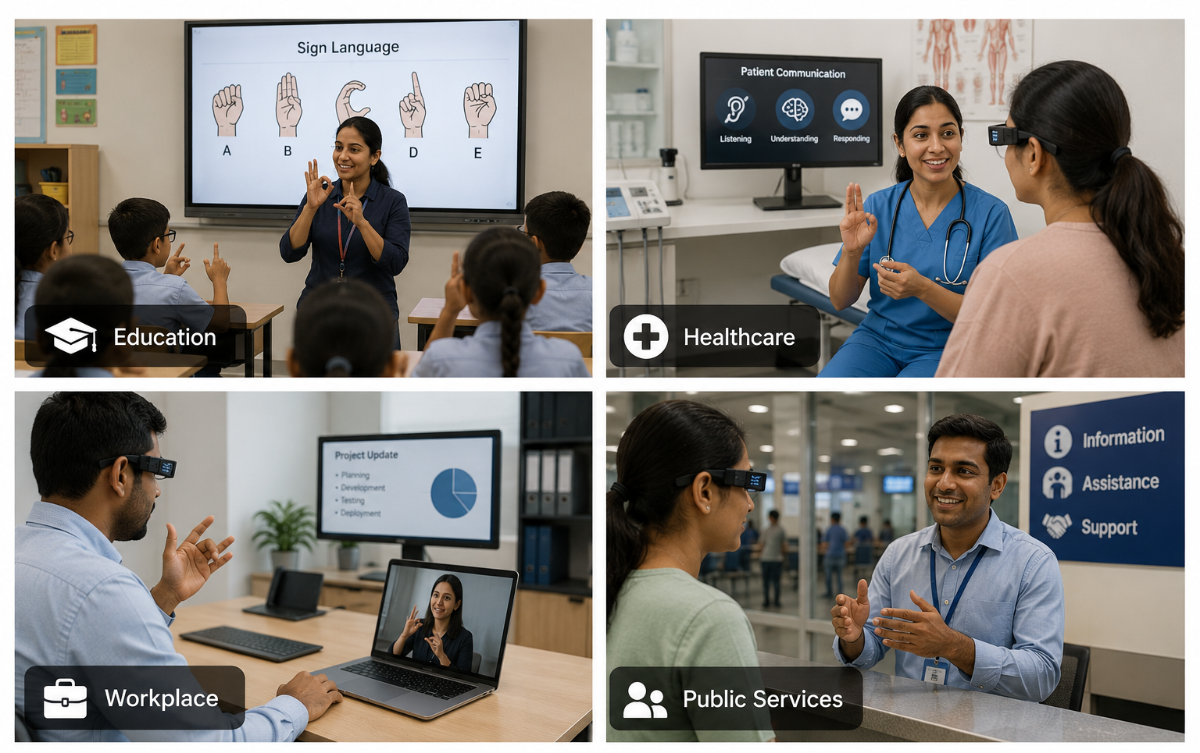
The social value of the project is one of its strongest assets. It is not a gadget for a shelf; it is a tool that can reduce friction in real human interactions.
43. Conclusion
SPARC is more than a gesture recognition system; it is a practical assistive technology platform designed to improve accessibility, independence, and communication for Deaf and speech-impaired individuals. By combining computer vision, machine learning, speech synthesis, wearable electronics, and real-time feedback mechanisms, the project demonstrates how multiple technologies can work together to solve a meaningful real-world problem.
Throughout the development journey, the focus remained on creating a solution that is portable, user-friendly, and capable of operating in real-world environments


