




Find My Book - AI & IoT Smart Library Management System
Find My Book is an advanced AI and IoT-powered Smart Library Management System designed to transform traditional library operations into a fully automated, efficient, and user-friendly experience. The system integrates intelligent hardware components, real-time database management, and interactive user interfaces to streamline book searching, issuing, returning, and theft prevention within a single unified platform.
At its core, the project addresses a common problem faced in libraries—difficulty in physically locating books even when they are digitally available. To solve this, the system provides precise, real-time navigation assistance using LED-guided shelves, enabling users to locate books within seconds without manual searching or staff assistance.
Circuit Diagram
- ESP8266-based Circuit Diagram:
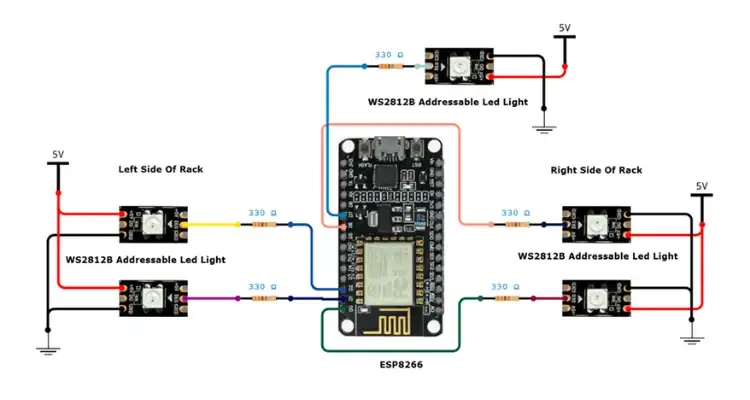
This circuit controls the LED-based shelf navigation system. It uses an ESP8266 module to drive multiple WS2812B LED strips installed on different parts of a bookshelf.
The ESP8266 acts as a smart rack controller. It receives commands over Wi-Fi from the ESP32-S3 Box and lights up specific LED strips based on the book’s location.
Multiple WS2812B LED strips are connected to the ESP8266 to cover:
- Left side of the rack
- Right side of the rack
- Top or glow section of the rack
Each LED strip’s data line is connected through a 330Ω resistor to protect the LEDs and ensure signal stability.
- Arduino Uno Based Circuit Diagram:
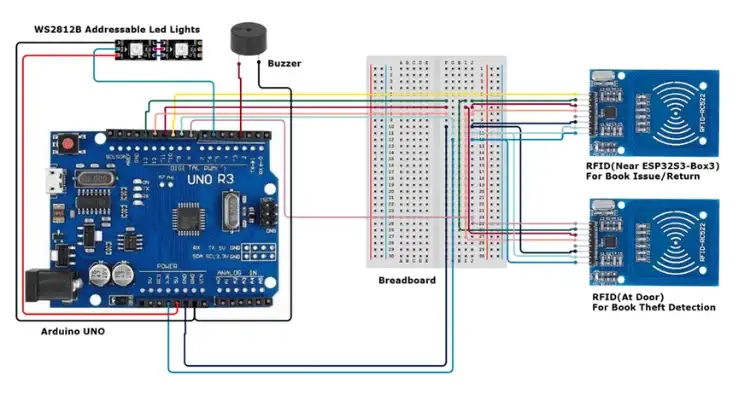
This circuit is responsible for book issuing, returning, and theft detection. It uses an Arduino Uno as the main controller along with two RFID readers, a buzzer, and an addressable LED strip.
Arduino reads RFID tag data, processes it, and communicates the result to the ESP32-S3 Box through serial communication. That data is then further processed by the ESP32-S3 Box and then the required operations takes place.
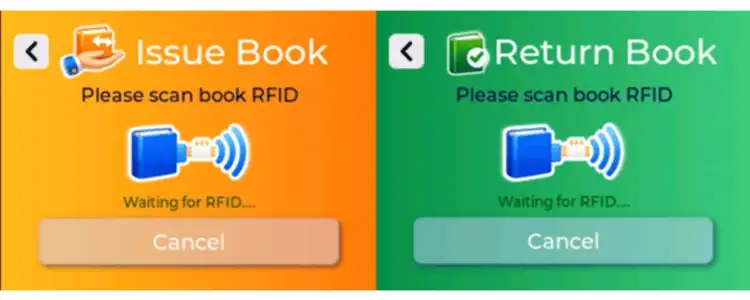
The RDID near ESP32-S3, will help in issue book and return book only. Once scanned, if the screen is for RFID scan as shown below, then the mentioned task will take place.
Further if RFID at Door is scanned, no matter which screen is open, the ESP32 Box S3 will go through the database and if that book is not issued, then it will alert us with the addressable led lights and buzzer.
System Overview
Books
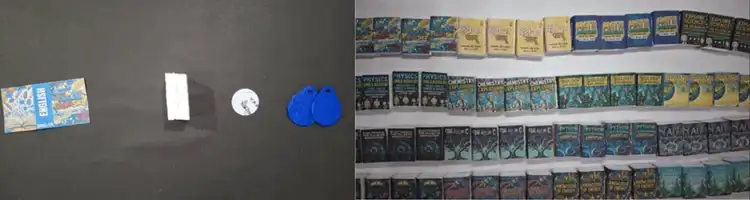
Books in the system are tagged with individual RFID tags. These are read via MFRC522 modules during the issuing and returning process. Each tag uniquely identifies a physical copy of the book, allowing the system to track the exact movement of inventory. This rfid also help in preventing the book theft.
Book Shelves
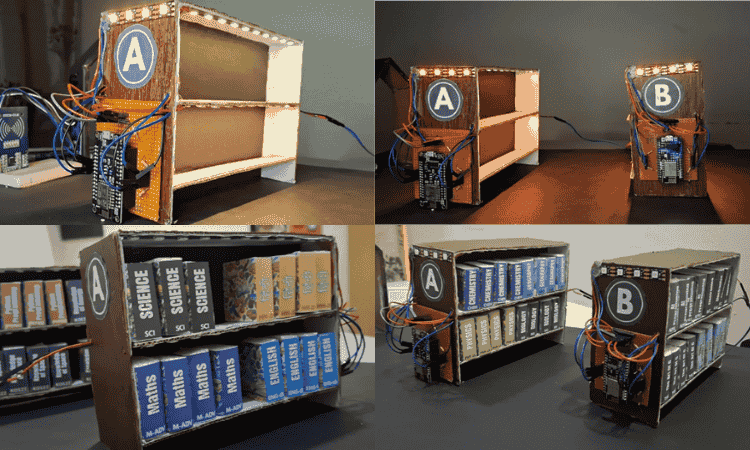
Each book shelf is equipped with an ESP8266 module connected to WS2812B addressable LEDs through 330Ω resistors. These LED strips run across shelves to provide visual guidance. When a user searches for a book, the ESP32-S3 Box sends commands to the respective ESP8266 module over Wi-Fi to blink specific rows, columns, or the top of the shelf in distinct colors. This allows for quick and intuitive book locating.
Door System
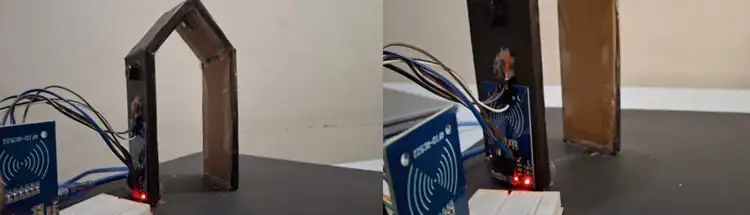
The exit system of the library features another RFID scanner and acts as a theft detection unit. It contains:
- An MFRC522 RFID reader to detect outgoing books
- WS2812B LEDs for visual alerts
- A buzzer for sound alerts
If a book that hasn’t been properly issued is detected near the exit, the system marks it as a theft attempt. The buzzer and LEDs flash in a red warning pattern to notify staff and users. This module operates autonomously and communicates with the ESP32-S3 Box for validation.
ESP32-S3 Box UI Interface
The ESP32-S3 Box serves as the primary human-machine interface.
User Interface Flow:
The user interface is designed for simplicity and quick interaction. The flow includes:
- Home Screen
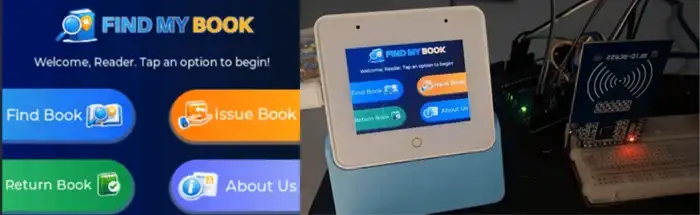
- The home screen appears after the startup animation.
- It consists of options for 'Find Book', 'Issue Book', 'Return Book', and 'About Us'.
Find Book
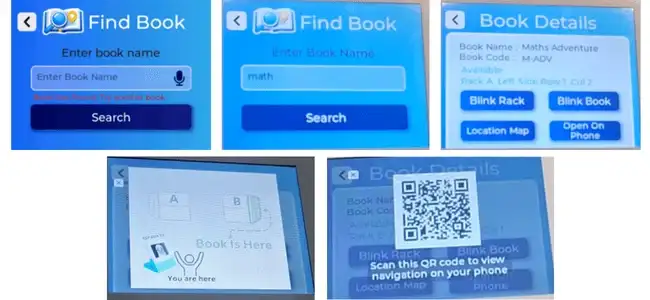
- Allows users to enter book name.
- Book details are then fetched from Raspberry Pi via API. If found, the book details will appear including title, status, and exact location (rack, side, row, column) else it will raise the error “Book Not Found, Try another Book”.
It also have some Action Buttons:- Blink Shelf: Lights up the LED strip at the top of the rack where the book is placed.
- Blink Book: Lights up the row/column using a random color and mirrors this color on the ESP32 screen.
- Location Map: Shows a map layout which shows where are we standing and where is the book’s position.
- Open on Phone: Displays a QR code that links to the book’s page on the local web server.
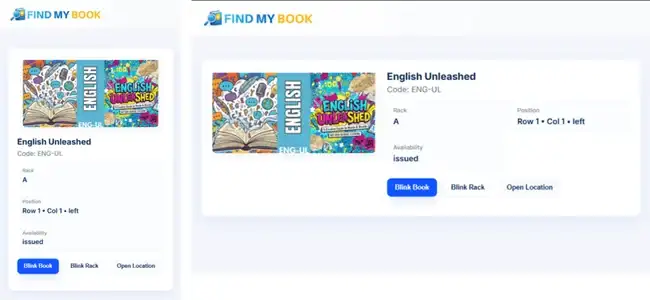
- QR Code Page on Mobile:
- Upon scanning, the same options from ESP32 interface are available to continue the search seamlessly from a mobile device.
- On the webpage it Displays same book details
And Provides Blink Shelf, Blink Book, and View Map buttons
Issue Book
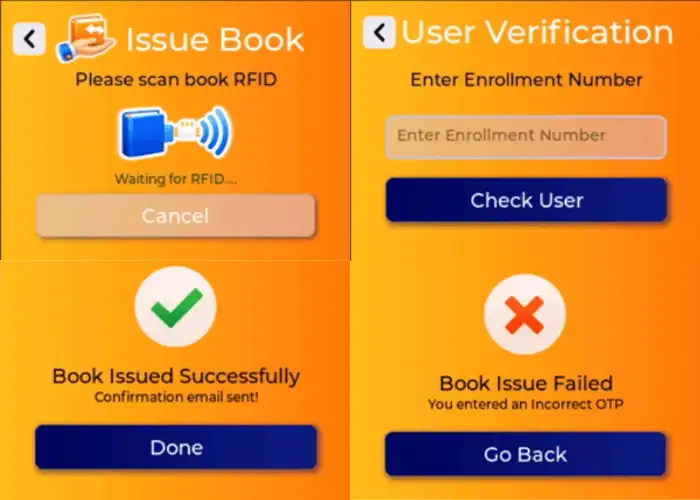
- The user will Scan book via RFID near the ESP Box.
- After that if the RFID is valid / Not issued by any other user then they will be prompted for enrollment number.
- After that it will display user + book info.
- If the user confirm it then Email OTP will sent and user will be prompted to enter the otp.
- Enter OTP:
- If correct → Issue book → Show success screen → Email confirmation
If incorrect → Show failure screen
- Return Book
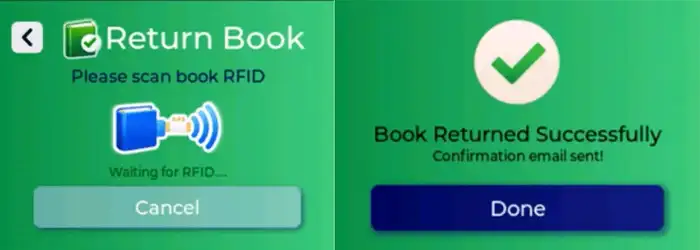
- The user will Scan book via RFID near the ESP Box.
- If the book UID / RFID is marked issued in DB:
- It will mark the book as issued
- Set status to ‘available’
- Show return confirmation + email will be sent
Anti Theft System
.webp)
The system also incorporates an anti-theft and exit security mechanism to prevent unauthorized removal of books from the library. An RFID scanner is installed at the entry–exit gate, which continuously monitors books passing through the exit. Whenever a book is detected, the system verifies its issue status by checking the backend database.
If a book has been properly issued, the system allows it to pass and provides a visual and audio confirmation using a green indicator light along with a buzzer beep. In contrast, if an unissued book is detected at the exit, the anti-theft system is immediately triggered. In this case, a red warning light starts blinking and a buzzer alert is activated, clearly indicating an unauthorized attempt to remove the book from the library.
This mechanism helps prevent both accidental and intentional book theft while ensuring that the library inventory remains accurate and secure. By automating exit verification using RFID and real-time database checks, the system eliminates the need for manual inspection and enhances overall library security.
Voice Assistance Integration
The Find My Book system also includes a voice assistance feature to enhance accessibility and provide a hands-free interaction experience for users. This feature allows users to control core functionalities of the smart kiosk using natural voice commands.
Currently, due to microphone compatibility issues with the ESP32-S3 Box 3, voice input is captured using a mobile phone microphone. The system listens for a predefined wake phrase, “Smart Library”, after which it processes spoken commands and triggers the corresponding actions within the application.
Users can perform various operations through voice commands. For example, saying “Smart Library, find math book” automatically opens the corresponding book details page. Similarly, commands such as “Smart Library, issue book” and “Smart Library, return book” navigate directly to the respective screens. After navigation, the user continues with the standard workflow, including RFID scanning and verification processes.
This feature improves usability, reduces manual navigation, and demonstrates the potential for future integration of fully voice-controlled smart library systems.
Raspberry Pi Server
Hosts A Raspberry Pi is used as the backend server. It runs a Flask application and stores data using an SQLite database. The server handles book search requests, issuing and returning operations, OTP verification, email notifications, theft help and logs all activities.
Database Schema
book_types
| Field | Type |
| book_type_id | TEXT (PK) |
| name | TEXT |
| rack | TEXT |
| side | TEXT |
| row | INTEGER |
| column | INTEGER |
book_copies
| Field | Type |
| copy_uid | TEXT (PK) |
| book_type_id | TEXT (FK) |
| status | TEXT (default: ‘available’) |
issue_logs
| Field | Type |
| id | INTEGER (PK, Auto Increment) |
| copy_uid | TEXT (FK) |
| enrollment_no | TEXT (FK) |
| action | TEXT |
| timestamp | DATETIME (default: CURRENT_TIMESTAMP) |
users
| Field | Type |
| enrollment_no | TEXT (PK) |
| name | TEXT |
| TEXT |
Admin Page
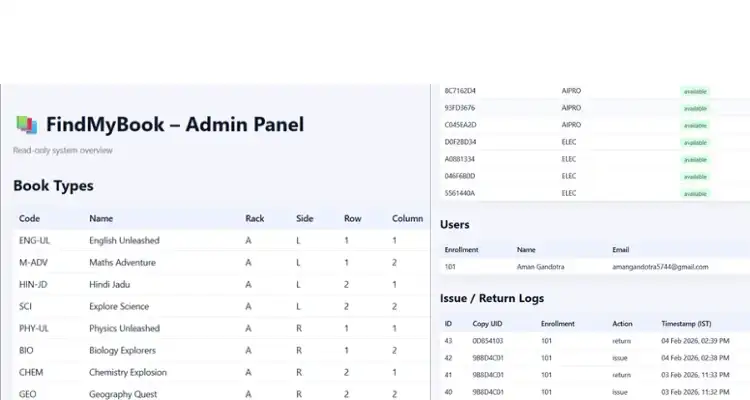
The Find My Book Admin Page is a read-only dashboard designed to provide a complete overview of the library system. This page is intended for monitoring and verification purposes and does not allow direct modification of data.
The admin page displays detailed information about book types and book copies, including their availability status and current location within the library. This ensures that the inventory can be monitored in real time.
In addition to book data, the admin page also shows information related to users, such as registered user details stored in the system database.
All issue and return activities are recorded and displayed under the issue logs section. Every transaction is logged automatically, allowing easy tracking of book movement and system activity.
Overall, the admin page acts as a centralized monitoring interface that helps maintain transparency, accuracy, and reliability across the entire Find My Book system.
Code & Code Explanation
The complete code for this project can be found on the GitHub link below:
https://github.com/amangandotra/Smart-Library
ESP32-S3 Box: The ESP32-S3 Box uses the LVGL graphics library to render a smooth and touch-responsive user interface. The ui is designed on SquareLine Studio. It controls the entire flow of operations, including displaying search results, initiating book blinks, capturing RFID input, and interacting with the Flask backend through HTTP APIs. It is also responsible for managing OTP verification and displaying animated feedback for both successful and failed operations.
ESP8266 Modules: These act as smart rack controllers. When they receive specific blink instructions via Wi-Fi, they drive addressable WS2812B LEDs to guide the user toward the correct shelf or book. They are strategically placed on different racks and light up only when instructed, conserving power and reducing confusion.
Arduino Uno: Since the ESP32 faced limitations in certain RFID libraries, the Arduino Uno was introduced to handle all RFID scanning operations. It reads tag data, sends it via Serial to the ESP32-S3 Box, and listens for responses such as "ISSUED" or "THEFT DETECTED" to perform actions like blinking LEDs or triggering buzzers.
Flask Server (Raspberry Pi): This is the brain of the system. It serves as the backend API layer, handles routing, OTP logic, book availability, and logs all actions (issue/return). It communicates directly with the SQLite DB and sends notification emails using SMTP services.
Video
Code :- GitHub Link : https://github.com/amangandotra/Smart-Library


